I’ve always had difficulties with color…not to say I don’t use it, nor use it well. But it’s always been a detail in my own artwork that I’ve had to consciously push…otherwise, I end up with end-products that are always just in red, black, and white.
Now both in teaching students and talking to clients, I find myself trying to explain how important it is to put some thought into using more color in a project. Check out this info-graphic that demonstrates how colors affect shopping purchases (Kissmetrics)
Here’s a cool collection of 40 photoshop lighting effects that I had bookmarked for a few months intending to post at some point. While I’ve been quite eager to use one or two of these techniques at some point in time, I haven’t really found any commercial uses for them….yet. But they’re really easy ways to elicit some “Ooohs” and “Aaahs” from random viewers. (via Vandelay Design)
I think the biggest thing I’ll take away from that writing is that you must work with, or hire, people that are better than you at their jobs. I still have that dream in my head where I want this business to be….now if only I can tackle the rest of my life this systematically, it’d be great!
This sketch work/scribble caught my attention the other day. At first glance it truly looks like just a bunch of random doodling (which is cool enough it its own right) but once you see the process, there was an amazing amount of detail, time, and attention put into this thing. And all done with Photoshop none-the-less. (OwaikeO via Abduzeedo)
Here’s a collection of some great design rules that should be considered when doing web-design. But a few of these are good rules for any artwork in general. A few of these we’re even going to cover in class… (via 3.7 Designs)
Today’s 1st day of instruction went well. I dusted off a year’s worth of teaching absence and got through it relatively unscathed. There were some false starts in the early part of my first class but got rolling fairly well after the 1st hour. I think by the end of my 2nd class I started to feel my voice start leaving me… I think I’ll need to bring a jug of coffee with me to class.
To the students of Art 112 (if any of you are reading this) thanks for coming to class today and I hope to see many of your faces again next week Tuesday.
On that note, I bookmarked a great link the other week from a designer named Frank Chimero. This was his advice to budding graphic design students. I liked many of his thoughts:
Look people in the eyes when you are talking or listening to them. The best teachers are the ones who treat their classrooms like a workplace, and the worst ones are the ones who treat their classroom like a classroom as we’ve come to expect it. Eat breakfast. Realize that you are learning a trade, so craft matters more than most say. Realize that design is also a liberal art. Quiet is always an option, even if everyone is yelling. Libraries are a good place. The books are free there, and it smells great.
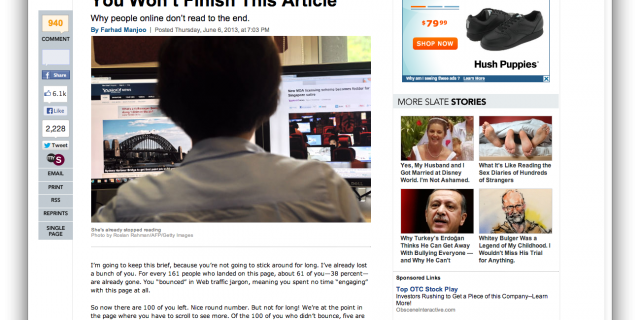
Apparently, not very much. In summary, (even though this article is 3 years old) people were already only reading at most 28% of your words on an average visit, spending maybe 4.4 seconds on each 100 words. I’d wager a guess that maybe now, 3 years later, these numbers have dropped…viewers spending even less time dwelling on your site and absorbing even less content.
My own site visitation numbers seem to correlate that finding. I think I average about over 8k visitors per month (where are you?), but a good portion of that traffic dwells here less than 4 seconds. They probably see what terrible writing I have and leave faster than they can hit the back button.
Anyway, it’s good to keep that article to support me when I’ve been urging clients to trim content into bite-sized chunks as much as possible.
Another cool behind-the-scenes video showing how you can achieve studio-quality photos using just a simple iPhone 3GS camera. Again proving the point it’s not the camera you use, but it’s the photographer behind it.
What I personally love most about this studio reveal is seeing how they set up the lighting…. I want those softboxes and lights now! Damnit! (via Gizmodo)
I’m trying to avoid being Apple-centric…but with the release of the iPhone4 just last week, it’s hard to avoid at least some kind of conversation about it. I actually saw my first iPhone4 in hand yesterday….a associate of mine actually braved that long line to get one. I must say that Retina display is pretty pretty pretty nice.
OK, enough stroking Steve Job’s ego. Here’s a recent little thing a friend of mine asked me to do the other day — she asked me how to create a custom icon for her website on her iPhone. There was another local company charging people money for this service saying how they’re the “only people in town who did this….” Pfffffffffffffffft.
Turns out it’s incredibly easy…honestly this will take you less than 2 minutes to do it. Here’s what you do:
Open your favorite graphic program and make a new file that’s 45×45 pixels. Keep it 72dpi if you like….possible the new retina displays on the new phones can handle a higher resolution but I don’t have one to test (buy me one?)
Now create your artwork….doesn’t need any further flourish. You don’t need to round the corners, nor do you need to put any kind of reflective layers on it either. The iPhone will do that automatically.
Now save your file as a .PNG file and name it “apple-touch-icon.png“. Upload it to the root directory of your website.
That’s really it. See? 2 minutes maybe? 5 minutes tops?
The next time you open up your website in the iPhone Safari browser, click on the little plus “+” icon and select “Add to Home Screen“. Viola! Your new icon should turn up. Needless to say anyone who bookmarks your site on their iPhone (should you be so lucky) will have your new icon appear on their phone.
With so much possible these days in the area of online design, about the only thing holding a developer back is time, budget, and the ever-present browser compatibility. It’s still neat to look at demos of what’s possible though. Like this great collection of tutorials and examples of what you can do with CSS3. There are a lot of examples where folks have replicated Flash effects, down to techniques about how to replicate Photoshop graphics with it as well.
Some of the demos are more fun than practical…like the coke can demo above, but still very cool and inspirational nonetheless. (via Roman Cortes)